> For the complete documentation index, see [llms.txt](https://docs.i3d.net/llms.txt). Markdown versions of documentation pages are available by appending `.md` to page URLs; this page is available as [Markdown](https://docs.i3d.net/game-hosting/elements/deploymentenvironment/fleet.md).
# Fleet
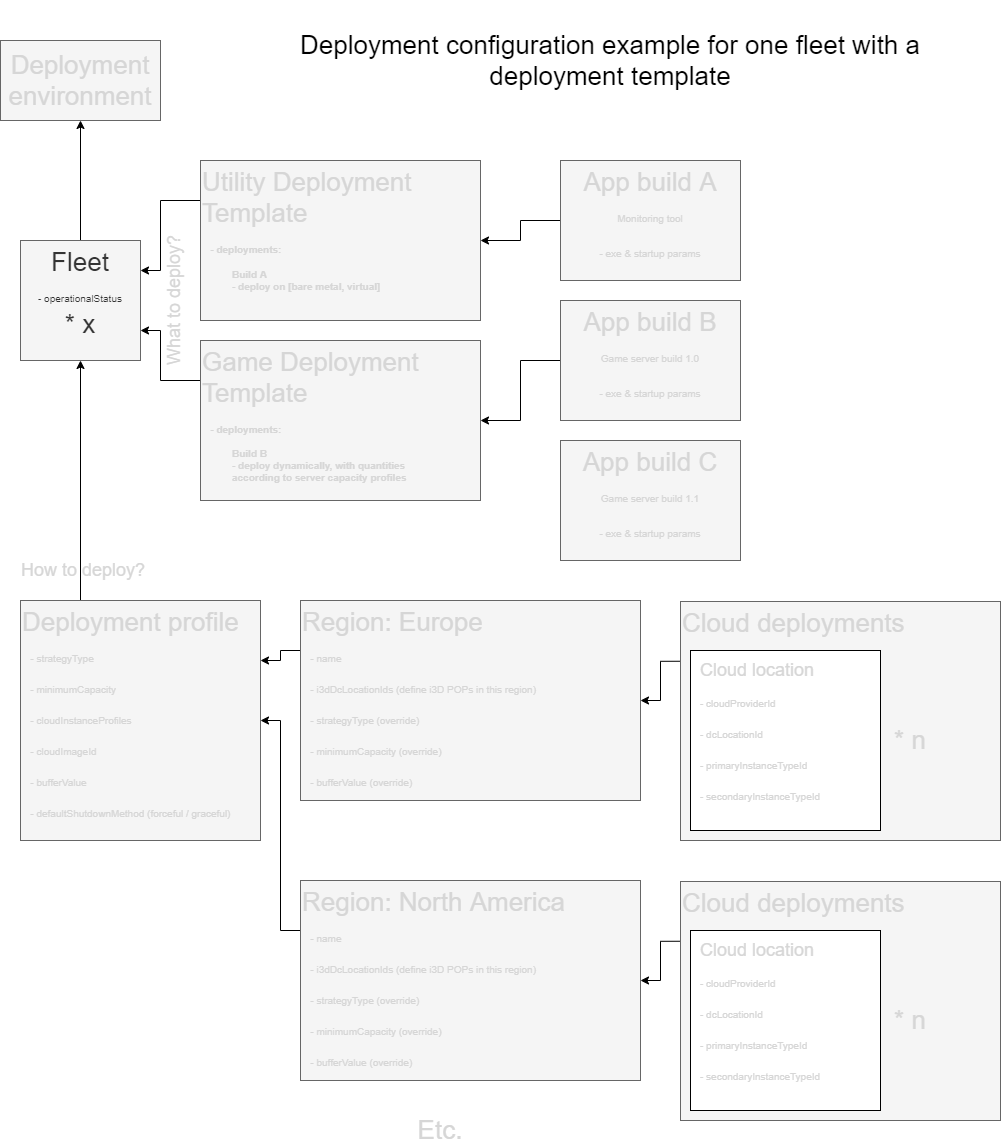
The Fleet is the second layer within the deployment configuration hierarchy. It's a direct descendant of the DeploymentEnvironment.
Figure 1: Fleet's place in the Deployment Configuration
## Usage
A Fleet is simply a sub-division of a DeploymentEnvironment. It does not represent a collection of hosts (bare metal or VM).
You can have as many Fleets under a [DeploymentEnvironment](/game-hosting/elements/deploymentenvironment.md) as you like. There are no limits to this. The only limit we have is that only one fleet at a time can be deployed on a host.
Fleets are normally used to differentiate between different builds or platforms such as PC, Xbox, Playstation, Switch, etc. But it can also be used to deploy instances for temporary or testing purposes while keeping these separate from other fleets.
Each Fleet has a number of template properties that will point to the following template types:
* [Game Template](/game-hosting/elements/deploymentenvironment/index/gamedeploymenttemplate.md): defines which game build to deploy
* [Utility Template](/game-hosting/elements/deploymentenvironment/index/utilitydeploymenttemplate.md): defines which utility build(s) to deploy
* [Dependency Template](/game-hosting/elements/deploymentenvironment/index/dependencydeploymenttemplate.md): defines which dependency (un-)installer to run for each Host
* [Host Capacity Template](/game-hosting/elements/deploymentenvironment/hostcapacitytemplate.md): defines how many application instances can be deployed onto a Host of a certain type
Additionally you have to assign a [DeploymentProfile](/game-hosting/elements/deploymentenvironment/deploymentprofile.md), telling the Fleet in which regions and DC Locations to deploy.
Automatic deployment and scaling can be controlled per Fleet and is determined by its [operational status](#operational-status).
{% hint style="info" %}
A Fleet's template properties can only be updated if there are no Application Instances deployed within that Fleet.
{% endhint %}
```
You can still add new templates, where there were none before, but changing or removing them can only be done when there are no ApplicationInstances in the Fleet.
```
## Completing a Fleet's properties
When you first create a new Fleet, you must provide a name and a deploymentEnvironmentId. All other properties / references can be left blank. This allows you to create a fleet before all other necessary elements have been created. Elements such as a [DeploymentProfile](/game-hosting/elements/deploymentenvironment/deploymentprofile.md) and [GameDeploymentTemplate](/game-hosting/elements/deploymentenvironment/index/gamedeploymenttemplate.md) can be referenced at a later time. Note that a Fleet cannot be used before at least the DeploymentProfile and GameDeploymentTemplate properties have been populated.
{% hint style="info" %}
Please note if you delete a file or you update it on the CDN that is still in use in one or more of your fleets, your original file is not available anymore and will cause issues when you try to use in that fleet. You cannot have multiple versions from the same game running on the system. You must push a new file and use the PatchJob to patch your files.
{% endhint %}
## Operational status
A Fleet's operational status determines whether automatic deployment and / or automatic scaling of [ApplicationInstance](/game-hosting/elements/application/applicationinstance.md)s is enabled or not.
Automatic deployment (operationalStatus = 1) will deploy ApplicationInstances according to the minimumCapacity setting of the DeploymentProfile linked to a Fleet. This will result in a statically deployed amount (DeploymentProfile.minimumCapacity) of ApplicationInstances. No dynamic up- or downscaling will occur.
To enable dynamic up- or downscaling for a Fleet, you must set its operationalStatus value to 2 (automatic scaling enabled - implies automatic deployment).
Setting operational status to disabled (operationalStatus = 0) means no deployment of any kind is performed. No up- or downscaling will be performed. If you have deployed applications in a Fleet, these will be left alone.
An explanation of how dynamic and automatic scaling works can be found in the [Automatic Deployment](/game-hosting/processes/automatic-deployment.md) chapter.
### Operational status = 0 (manual)
When `isReserved` is `0` you may deploy any Application Instance on the Host. As soon as the first Application Instance is deployed on the Host, the Host's `fleetId` is set to the Fleet that is attached to said Application Instance. From then on, the Host can only be used for Application Instances belonging to that Fleet.
When `isReserved` is `1` this behaviour remains the same, but in addition when a Host is drained of Application Instances it will not be made available for another Fleet.
{% hint style="warning" %}
When [un-reserving](/api/api_one.md#v3-fleet-fleetid-operationalstatus){:target=\_blank} a Host for a Fleet which has Application Instances deployed you will need to manually remove these Application Instances in order for the Host to be eligible for deployment for Application Instances of another Fleet.
{% endhint %}
### Operational status = 1 (automatic deployment)
The behaviour is the same as above. With automatic deployment however, you generally never reach the state where you organically drain Application Instances on a Host to cause it to reset its `fleetId`, since they will be automatically deployed again.
### Operational status = 2 (automatic scaling)
A Host is assigned a `fleetId` when Application Instances are deployed on it. When `isReserved` is `0` the scaler will determine which Host is deployed for which Fleet. As soon as a Host drains of Application Instances, its `fleetId` will be reset to `0` and it may be used for any other Fleet that is eligible. When `isReserved` is `1` and automatic scaling is enabled the Host's `fleetId` will never be reset to `0` and the Host will always be available for said Fleet.
When you [un-reserve](/api/api_one.md#v3-fleet-fleetid-operationalstatus){:target=\_blank} a Host for a Fleet the Host will keep serving Application Instances until all Application Instances have been organically drained and eventually its `fleetId` is reset to `0`. At that point the Host may be occupied by any other eligible Fleet (or the same Fleet if capacity is required again).
## Element structure
| Property | Value type | Required | Description |
| ------------------------------ | ---------- | --------- | ---------------------------------------------------------------------------------------------------------------------------------------------------------------------------------------------------------------------------------------------------------------------------------------- |
| id | string | Read-only | Unique identifier of this element |
| name | string | Yes | Name of the deployment environment |
| deploymentEnvironmentId | string | Yes |
Indicator of how this Fleet is operating with regards to automatic deployment and scaling: 0: Disabled 1: Automatic deployment enabled 2: Automatic scaling enabled (implies automatic deployment)
|
Table 1: Fleet element structure
## API example
Create a new Fleet within your i3D.net account.
[Full API reference](/api/api_one.md)
#### HTTP request
[`POST /v3/fleet`](/api/api_one.md#v3-fleet)
#### Request body
```
{
"name": "Bluewolf PC",
"deploymentEnvironmentId": "173892217340309897",
"deploymentProfileId": "8068976724396537810",
"gameDeploymentTemplateId": "2190484266497878757",
"utilityDeploymentTemplateId": "1316371245160957961"
"dependencyDeploymentTemplateId": "6537333393893172977",
"hostCapacityTemplateId": ""
}
```
#### Response body
```
[
{
"id": "7420099900751948711",
"name": "Bluewolf PC",
"deploymentEnvironmentId": "173892217340309897",
"deploymentProfileId": "8068976724396537810",
"gameDeploymentTemplateId": "2190484266497878757",
"utilityDeploymentTemplateId": "1316371245160957961",
"dependencyDeploymentTemplateId": "6537333393893172977",
"hostCapacityTemplateId": "",
"operationalStatus": 0
}
]
```
The `operationalStatus` property is currently 0. This means automatic deployment is disabled. We will enable this in the next chapter, Starting Automatic Deployment after all configuration elements are in place.
## Reserving a Host for a Fleet
Reserving a Host{:target=\_blank} for a Fleet is the act of making sure that your Host may only ever deploy Application Instances that belong to that Fleet. Even if the Host is empty and could otherwise be used to deploy Application Instances for another Fleet it will remain empty until Application Instances are required for the reserved Fleet.
The behaviour of the reserving of a Host is dependent on the Operational Status of the Fleet.
## Related topics
* [Orchestrator Overview](/game-hosting/game-integration/orchestratoroverview.md)
* [Game Deployment Quick Start Guide](/game-hosting/overview/quick-start.md)
* [i3d.net API documentation](https://www.i3d.net/docs/api/v3/all/)
---
# Agent Instructions
This documentation is published with GitBook. GitBook is the documentation platform designed so that both humans and AI agents can read, navigate, and reason over technical content effectively. Learn more at gitbook.com.
## Querying This Documentation
If you need additional information that is not directly available in this page, you can query the documentation dynamically by asking a question.
Perform an HTTP GET request on the current page URL with the `ask` query parameter, and the optional `goal` query parameter:
```
GET https://docs.i3d.net/game-hosting/elements/deploymentenvironment/fleet.md?ask=&goal=
```
`ask` is the immediate question: it should be specific, self-contained, and written in natural language.
`goal` is optional and describes the broader end goal you are ultimately trying to accomplish on behalf of the user. GitBook uses it to tailor the answer towards what is most useful for that goal.
The response will contain a direct answer to the question and relevant excerpts and sources from the documentation.
Use this mechanism when the answer is not explicitly present in the current page, you need clarification or additional context, or you want to retrieve related documentation sections.