> For the complete documentation index, see [llms.txt](https://docs.i3d.net/llms.txt). Markdown versions of documentation pages are available by appending `.md` to page URLs; this page is available as [Markdown](https://docs.i3d.net/game-hosting/elements/deploymentenvironment/deploymentprofile.md).
# Deploymentprofile
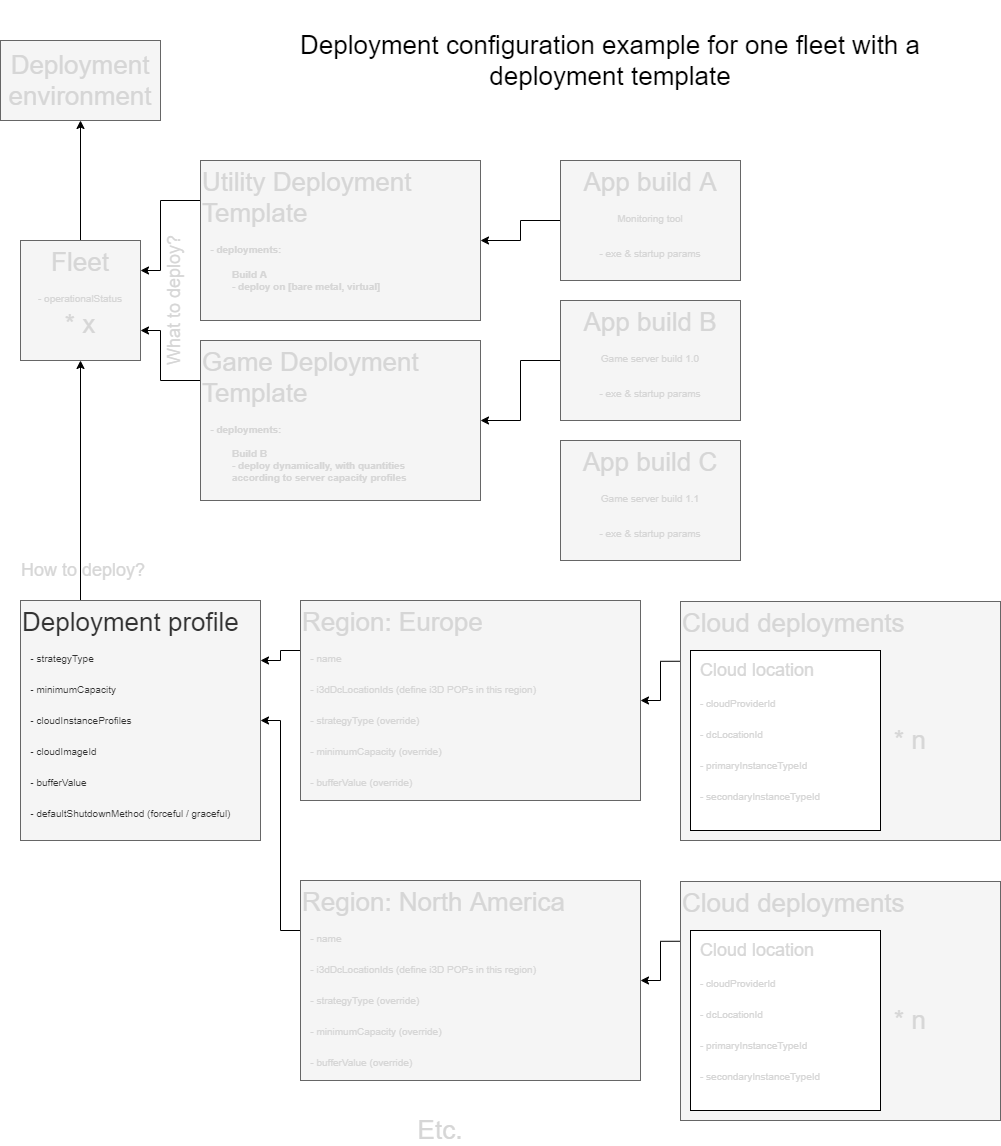
The DeploymentProfile is the main element that determines how your [ApplicationInstances](/game-hosting/elements/application/applicationinstance.md) will be deployed.
Figure 1: Highlighting where the DeploymentConfiguration element belongs in the overview
## Usage
A DeploymentProfile is always the only child of a [Fleet](/game-hosting/elements/deploymentenvironment/fleet.md). As such, you can only have one DeploymentProfile per Fleet.
A DeploymentProfile allows you to set global deployment configuration options which define how ApplicationInstances are deployed within its [DeploymentRegion](/game-hosting/elements/deploymentenvironment/deploymentregion.md) children. DeploymentRegions allow you to override most configuration options.
## Element structure
| Property | Value type | Required | Description |
| ----------------- | --------------------------------------------------------------------------------------- | --------- | ---------------------------------------------------------------------------------------------------------------------------------------------------------------------------------------------------------------------------------------------------------------------------------------------- |
| id | string | Read-only | Unique identifier of this element |
| name | string | Yes | Name of the DeploymentProfile |
| description | string | No | A custom description |
| strategyType | int | Yes |
Deployment strategy 1: round robin
|
| minimumCapacity | int | Yes | The minimum amount of game instances that should always be deployed for each region in this fleet. Can be overridden per region |
| bufferValue | int | Yes | Global buffer value, to be applied to individual deployment regions. Can be overriden per region |
| bufferValueType | int | Yes |
Interpretation of the bufferValue property: 0: absolute value 1: percentage value (must be accompanied by bufferValueMin and bufferValueMax)
|
| bufferValueMin | int | No | The minimum absolute buffer value when using a percentage, to prevent bufferValue from going to low |
| bufferValueMax | int | No | The maximum absolute buffer value when using a percentage, to prevent bufferValue from going to high |
| markedForDeletion | boolean | Read-only | When true, we will also make sure `markedForDeletion` will be set to true in all subsequent deployment regions. We will then only scale down in those regions until all game servers and VMs have been removed. When that situation is reached, we will set the deployment profile to inactive |
| deploymentRegions | \[[DeploymentRegion](/game-hosting/elements/deploymentenvironment/deploymentregion.md)] | Read-only | All deployment regions of this profile |
| createdAt | int | Read-only | A unix timestamp of when this element was created |
Table 1: DeploymentProfile element structure
## Minimum capacity
When you enable automatic deployment or automatic scaling on a Fleet, our automatic scaling mechanism will start by deploying the number of Application Instances defined by the DeploymentProfile.minimumCapacity value. The number of deployed instances will never drop below this value, even if there are no players at all. The minimumCapacity value as such can be used in preparation for a new release, to ensure you have enough game servers to begin with upon release of your game.
If the DeploymentProfile.minimumCapacity value exceeds your bare metal capacity, the scaler will continue to deploy in the cloud, provided cloud locations have been defined for the relevant regions.
The DeploymentProfile.minimumCapacity value defines the minimum capacity - minimum amount of deployed game servers - for each individual region. You can [override](#element-structure) this value per region in case you would like more instances deployed in a region where you expect more players. But keep in mind, minimumCapacity is just for the initial deployment of instances. Our scaling mechanism will of course start scaling instances if more players are needed \[in a certain region].
## The bufferValue
Besides the minimumCapacity setting, there is the bufferValue setting which determines the size of the pool of ApplicationInstances that must be available at all times. The purpose of this buffer is to catch sudden increases in the number of players and as such, to attempt (to ensure) there are always sufficient free game servers for your clients to join. In other words, the bufferValue is there to compensate for the time it takes to deploy game servers. The longer that takes (related to the size of your build files), the larger the buffer should be. The larger the buffer, the less risc there is of running out of available game servers. It is therefore important not to set this value too low.
## API example
Create a new DeploymentProfile within your i3D.net account.
[Full API reference](/api/api_one.md#v3-deploymentprofile)
#### HTTP request
[`POST /v3/deploymentProfile`](/api/api_one.md#v3-deploymentprofile)
#### Request body
```
{
"name": "",
"description": "",
"strategyType": 0,
"minimumCapacity": 0,
"maximumCapacity": 0,
"bufferValue": 0,
"bufferValueType": 0,
"bufferValueMin": 0,
"bufferValueMax": 0,
}
```
#### Response body
```
[
{
"id": 0,
"fleetIds": [
0
],
"name": "",
"description": "",
"strategyType": 0,
"minimumCapacity": 0,
"maximumCapacity": 0,
"bufferValue": 0,
"bufferValueType": 0,
"bufferValueMin": 0,
"bufferValueMax": 0,
"markedForDeletion": false,
"deploymentRegions": [],
"createdAt": 0
}
]
```
## Related topics
* [Orchestrator Overview](/game-hosting/game-integration/orchestratoroverview.md)
* [Game Deployment Quick Start Guide](/game-hosting/overview/quick-start.md)
* [i3d.net API documentation](https://www.i3d.net/docs/api/v3/all/)
---
# Agent Instructions
This documentation is published with GitBook. GitBook is the documentation platform designed so that both humans and AI agents can read, navigate, and reason over technical content effectively. Learn more at gitbook.com.
## Querying This Documentation
If you need additional information that is not directly available in this page, you can query the documentation dynamically by asking a question.
Perform an HTTP GET request on the current page URL with the `ask` query parameter, and the optional `goal` query parameter:
```
GET https://docs.i3d.net/game-hosting/elements/deploymentenvironment/deploymentprofile.md?ask=&goal=
```
`ask` is the immediate question: it should be specific, self-contained, and written in natural language.
`goal` is optional and describes the broader end goal you are ultimately trying to accomplish on behalf of the user. GitBook uses it to tailor the answer towards what is most useful for that goal.
The response will contain a direct answer to the question and relevant excerpts and sources from the documentation.
Use this mechanism when the answer is not explicitly present in the current page, you need clarification or additional context, or you want to retrieve related documentation sections.