> For the complete documentation index, see [llms.txt](https://docs.i3d.net/llms.txt). Markdown versions of documentation pages are available by appending `.md` to page URLs; this page is available as [Markdown](https://docs.i3d.net/game-hosting/elements/application/applicationbuild.md).
# Applicationbuild
The ApplicationBuild element points to your build archive which must be uploaded to the i3D.net CDN. You must provide information on how to run the build by assigning the name of the exectuable, provide startup parameters, which OS it must run on, etc.
[More information on Build Provisioning](/game-hosting/processes/application-build-provisioning.md)
## Element structure
| Property | Value type | Required | Description |
| ---------------------------- | ------------------------------------------------------- | --------- | ---------------------------------------------------------------------------------------------------------------------------------------------------------------------------------------------------------------------------------------------------------------------------------------------------------------------------------- |
| id | string | Read-only | Unique identifier of this element |
| name | string | Yes | User defined name of this element |
| applicationId | string | Read-only | Unique identifier of the Application element this belongs to |
| osId | int | Yes | ID of the operating system (see [Supported operating systems](#supported-operating-systems)) |
| stopMethod | int | No | The stop method that will be used on restart or destroy of an application instance. The default is taken from the value of [Application](/game-hosting/elements/application.md#element-structure).stopMethod - any value submitted here overrides that Application default |
| stopTimeout | int | No | The timeout that will be used on restart or destroy of an application instance. The default is taken from the value of Application.stopTimeout - any value submitted here overrides that Application default |
| executable | string | Yes | Name of the executable file that our system must run to start the application |
| startupParameters | string | Yes | Startup parameters passed to the executable |
| runAsNonePrivileged | int | No |
0: run as root user (default) 1: run as non-privileged user. This currently only works for builds deployed onto a Linux operating system. Windows builds will always run as administrator.
|
| instanceDoesReadyCallback | int | No | Set to 1 if a deployed application instance will inform the platform it's done with initializing and is ready to accept players. Defaults to 0 if not set, which means an [instance's status](/game-hosting/elements/application/applicationinstance.md#application-instance-status) will go directly to ONLINE (4) after starting |
| type | int | Read-only | The application build type. A list of types can be found in: [GET /application/type](/api/api_one.md#v3-application-type) |
| applicationBuildFile | ApplicationBuildFile | Yes | An object describing the location of the original build archive. |
| buildProvisioningStorageType | int | Yes | Type of storage being used. You can find all types in [GET/v3/builds](/api/api_one.md#v3-applicationbuild-storage-types) |
| hostCapacityTemplateId | int | No | ID of the [HostCapacityTemplate](/game-hosting/elements/deploymentenvironment/hostcapacitytemplate.md) to assign to this ApplicationBuild |
| label | \[[Label](/game-hosting/elements/application/label.md)] | No | Collection of client-defined labels |
| createdAt | int | Read-only | A unix timestamp of when this element was created |
Table 1: ApplicationBuild element structure
## Executable & startupParameters
You must provide us with the file name of the executable inside your build archive, in order for us to be able to run your application. If the executable is inside of a subfolder, you must provide this path as well. Note that the path here is relative.
When starting your application, we will append the contents of the `startupParameters` property to the executable. You can enter any command line arguments you need for your application to run properly. You can use variables inside the startupParameters to use dynamic values such as a game server's network port, IP address, host ID, game server ID, etc. All available variables are explained in the [Platform Variables](/game-hosting/elements/application/platform-variables.md) chapter. It includes an example with fictional startupParameters.
## Running with lowered privileges
By default we will run your applications with the root or administrator user. If you prefer, for security reasons, to run your utilities and / or game servers with lowered privileges, you can set the property `runAsNonePrivileged` to 1.
{% hint style="info" %}
This feature is only available on Linux as this time. Builds meant to run on Windows will always be exectued with the Administrator user.
{% endhint %}
## Supported operating systems
The platform currently supports the following operating systems that you can use to run your applications on:
* Ubuntu 18.04
* Ubuntu 20.04
* Ubuntu 22.04
* Centos 8
* Debian 10
* Debian 12
* Windows Server 2022 Standard
You can also programmatically fetch the list of supported operating systems via [`GET /v3/operatingsystem`](/api/api_general.md#v3-operatingsystem) and applying a filter on the 'odpSupported' property.
If you need to use an OS that is currently not supported, you can request support for this by [filing a ticket](https://one.i3d.net/Support/Tickets/) with us.
## ApplicationBuild labels
A user can define custom labels (key / value pairs) for an ApplicationBuild, to allow for easy identification and filtering of ApplicationBuild elements.
## ApplicationBuildProperty
Just like with the [Application](/game-hosting/elements/application.md) element, an ApplicationBuild can be assigned properties, by assigning [ApplicationBuildProperty](/game-hosting/elements/application/applicationbuildproperty.md) elements to an ApplicationBuild.
Note that properties assigned to an Application will already be inherited by an ApplicationBuild, so there is no need to re-define those for each ApplicationBuild. Unless you want to override a certain property for an ApplicationBuild.
## ApplicationBuild creation process flow
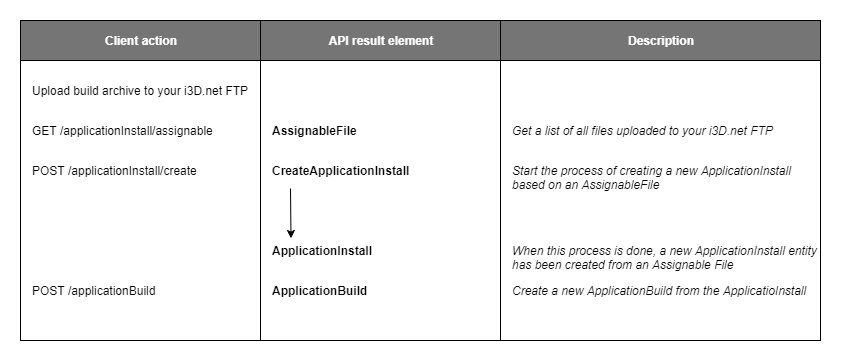
An ApplicationBuild is created by calling the endpoint `POST /applicationBuild` and is the final stage of [the ApplicationBuild creation process](/game-hosting/processes/application-build-management.md):
## Relations
See also: [Application element relations](/game-hosting/elements/application/element-relations.md)
## Restrictions
You can have any number of ApplicationBuilds on your account. There is no limit.
## Related topics
* [Orchestrator Overview](/game-hosting/game-integration/orchestratoroverview.md)
* [Game Deployment Quick Start Guide](/game-hosting/overview/quick-start.md)
* [i3d.net API documentation](https://www.i3d.net/docs/api/v3/all/)
---
# Agent Instructions
This documentation is published with GitBook. GitBook is the documentation platform designed so that both humans and AI agents can read, navigate, and reason over technical content effectively. Learn more at gitbook.com.
## Querying This Documentation
If you need additional information that is not directly available in this page, you can query the documentation by asking a question.
Perform an HTTP GET request on the following URL with the `ask` and `goal` query parameters:
```
GET https://docs.i3d.net/game-hosting/elements/application/applicationbuild.md?ask=&goal=
```
`ask` is the immediate question: it should be specific, self-contained, and written in natural language.
`goal` is what the user is ultimately trying to achieve, the reason they need the answer. Sharing it helps GitBook give you a better, more relevant answer. A goal is most helpful when it describes the outcome the user wants rather than restating the question. For example, with `ask=how do I create an API token`, a goal like `automate deployments from our CI pipeline` lets GitBook tailor the answer to that use case.
The response will contain a direct answer to the question and relevant excerpts and sources from the documentation.
Use this mechanism when the answer is not explicitly present in the current page, you need clarification or additional context, or you want to retrieve related documentation sections.